\
**Category:** Community Support\
**Created:** [June 3, 2026, 12:06am UTC](https://community.cloudcannon.com/t/typing-ampersand-becomes-amp-html-entity/555 "2026-06-03T00:06:34Z")\
**Posts on this page:** 4\
**Page:** 1
**Author:**  [@Tudor](https://community.cloudcannon.com/u/Tudor)\
**Post date:** [June 3, 2026, 12:06am UTC](https://community.cloudcannon.com/t/typing-ampersand-becomes-amp-html-entity/555/1 "2026-06-03T00:06:35Z")
Hey,
In the visual editor, whenever a user types an ampersand into a text input it gets written as the `&` HTML entity. The site I’m working on is an Astro project and I just use regular templating like `{section.heading}
` to render the text field which doesn’t decode the entities and leaves it as a literal “`&`” on the page. Is there a way to prevent the CloudCannon visual editor from converting an ampersand to the HTML entity? Or is that the wrong approach here?
Thanks.
---
**Author:**  [@Ryan](https://community.cloudcannon.com/u/Ryan)\
**Post date:** [June 4, 2026, 10:25pm UTC](https://community.cloudcannon.com/t/typing-ampersand-becomes-amp-html-entity/555/2 "2026-06-04T22:25:04Z")
Hey Tudor,
I’m guessing that you’re using a `type: html` rich text input, is that right? Since the text in those inputs is saved as HTML, CloudCannon encodes special characters like `&` to ensure there is a clear differentiation between the user’s input and the HTML that is generated (e.g. so that a user’s `<`s and `&`s aren’t interpreted as opening tags and escape sequences respectively).
If you do want to save this text back as HTML, you’ll need to make sure your templating code handles that by decoding it before render. Alternatively, you could consider using `_inputs` config to turn this into a plain text input (no HTML allowed).
Does that help / make sense?
---
**Author:**  [@Tudor](https://community.cloudcannon.com/u/Tudor)\
**Post date:** [June 15, 2026, 9:13pm UTC](https://community.cloudcannon.com/t/typing-ampersand-becomes-amp-html-entity/555/3 "2026-06-15T21:13:44Z")
Hey Ryan,
The input that I observed this behaviour with was actually unconfigured, so I don’t know which type it was. I tried entering an ampersand in an input configured with `type: text` and `type: textarea`, but those both wrote it as an `&` HTML entity. I’m not sure how to configure an input as a plain text input.
---
**Author:**  [@Ryan](https://community.cloudcannon.com/u/Ryan)\
**Post date:** [June 16, 2026, 3:09am UTC](https://community.cloudcannon.com/t/typing-ampersand-becomes-amp-html-entity/555/4 "2026-06-16T03:09:12Z")
The rich text input would have a toolbar at the top, like in this image:
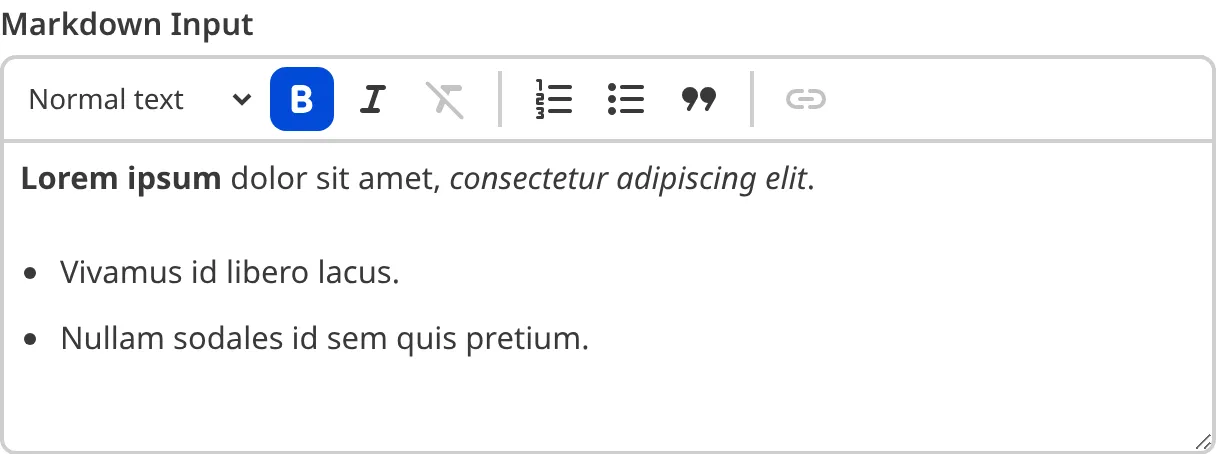
It sounds like you’re probably using a plain text input, so maybe there’s something else going on. I’ll message you directly to get some more details about your site and we can look at the specifics together 👀
🆕 Update: it looks like this is actually a bug in the Visual Editor. I’ve made a ticket to get this fixed. Thanks @Tudor for the heads up!