Add CloudCannon to Hugolify

Hi folks,

I’m Sébastien founder of Hugolify.

Hugolify is a Hugo framework that integrates several Headless, initially Netlify CMS then Decap CMS and Sveltia CMS. Recently I added compatibility with Pages CMS. Now I’m trying to add CloudCannon.

Hugolify is supposed to build the config file (via Hugolify Admin) for the CMS based on the requirements and settings. It has a library of collections, fields and blocks to simplify this CMS configuration.

I am currently working on the cloudcannon branch of:

My builder allowed me to create this file: see cloudcannon.config.yml in Hugolify-template (sorry I can’t add more links in this topic).

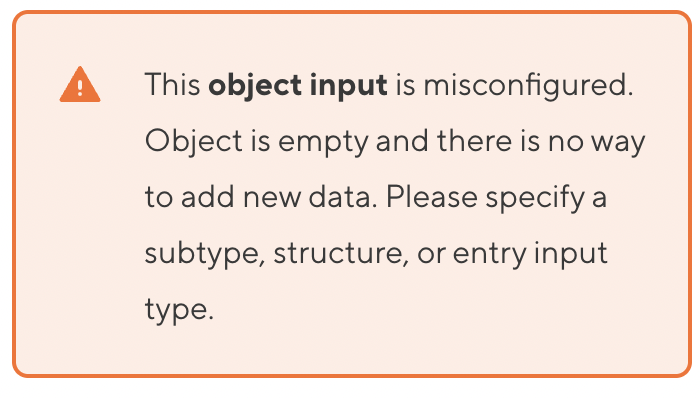
Currently I’m stuck on the array and object part with this error message even though I’ve added _inputs and subtype to options.

I’m pretty excited about adding CloudCannon to Hugolify so I hope I’ve been clear about my issue and motived CloudCannon experts :slight_smile:

This is just the beginning and I know there is still a long way to go to make Hugolify fully compatible with CloudCannon.

Cheers,

Sébastien

4 Likes

Hi Sébastien,

Welcome to the community :slight_smile: Sounds very interesting! We’re excited to see how it goes.

We’ve taken a look at your config for you (https://github.com/Hugolify/hugolify-template/blob/cloudcannon/cloudcannon.config.yml) and made some changes.

The changes:

  • add the correct structure config
  • reduce the duplication
  • remove any invalid keys

Here’s the result - just replace your existing config with this:

paths:
  static: static
  uploads: static/images/uploads

_snippets_imports:
  hugo: true

_inputs:
  date:
    type: datetime
    instance_value: NOW
    options:
      required: true
  description:
    type: text
    comment: Displayed in tabs, search results, and in SMS/Messages/Social networks preview
  draft:
    type: switch
    # default: true # TODO: move this default value to schema
  title:
    type: text
    comment: Displayed in tabs, search results, and in SMS/Messages/Social networks preview
    label: Page title
    options:
      required: true
  image:
    type: object
    options:
      structures: _structures.images
  images:
    type: array
    options:
      structures: _structures.images

_structures:
  images:
    values:
      - label: Image
        value:
          alt:
          credit:
          src:
        _inputs:
          alt:
            type: text
            comment: For an image that conveys information (leave blank if decorative image)
            label: Text alternative
          credit:
            type: markdown
            options:
              link: true
          src:
            type: image
            label: Image
            comment: 'Resize and compress image before sending: https://bulkresizephotos.com/fr?quality=90&type=width&width=1600'
            options:
              max_file_size: 7000
  offers:
    values:
      - label: Offer
        value:
          discount:
          hide_price: false
          price:
          text:
        _inputs:
          discount:
            type: text
            comment: 'Amount of the reduction, e.g: 30%'
            options:
              pattern: '^\d+%*$'
          hide_price:
            type: switch
          price:
            type: number
            comment: 'e.g.: 300000 (for 300 000 €)'

collections_config:
  pages:
    path: content
    create:
      path: '[relative_base_path]/{title|slugify}/_index.md'
    disable_add_folder: true
    icon: description
    schemas:
      default:
        path: archetypes/pages.md
  products:
    path: content/products
    create:
      path: '[relative_base_path]/{year}/{slug}.md'
    disable_add_folder: true
    schemas:
      default:
        path: archetypes/products.md
    _inputs:
      id:
        type: disabled
        instance_value: UUID
      isIndex:
        type: checkbox
        hidden: true
        # default: false # TODO: move this default value to schema
      offer:
        type: object
        options:
          structures: _structures.offers
      slug:
        type: text
        comment: 'Leave empty to automate with the title. **Be careful to SEO impact.**'
        options:
          pattern: '^[a-z0-9-]*$'
          pattern_message: Contain only lowercase letters, numbers, and hyphens, with no spaces, accents, or special characters

Rather than go through every change in here, let me know if there are any parts of this config file that you’re wondering about.

I’m also available to book for a video call if that’s easier for you.

Hope that helps! Keep us up to date on progress, or if you run into any blockers.

Best wishes,
Tom

1 Like

Hi @Tom_Richardson,

Thank you for your reply and clarifications.

Remove any invalid keys

I’m currently revising my builder so that it doesn’t include unnecessary arguments; it’s taking a while, but I’ll be finished soon.

Reduce the duplication

Since it’s a builder, duplication isn’t a problem for me, but could it be a performance issue for CloudCannon?

Add the correct structure config

The important question for me is: It is possible to use _inputs in array and object rather than structures?

Here’s what my builder is producing now:

Best wishes,
Sébastien

1 Like

Hey Sébastien,

The important question for me is: It is possible to use _inputs in array and object rather than structures?

You can configure the keys that are present inside of an object or array. But the syntax where you have an _inputs key inside of another inputs options is invalid. For example, this:

      image:
        name: Images
        options:
          _inputs:
            alt:
              comment: For an image that conveys information (leave blank if decorative image)
              name: Text alternative
              options:
                required: false
              type: text
          required: false
          subtype: object

Should instead become this:

      image:
        type: object
        name: Images
        options:
          subtype: object
      image.alt:
        type: text
        comment: For an image that conveys information (leave blank if decorative image)
        name: Text alternative
        options:
          required: false

The key difference being the use of dot syntax to configure an alt input inside of the image input. Just plain alt would work as well, but that wouldn’t be scoped to just alt inputs inside of image inputs — instead it would target any input on your site with the key of alt.

Hope that makes sense and answers your question! Let us know if not, or if you have any other questions.

Best wishes,
Tom

1 Like

Hi @Tom_Richardson,

I hope you had a good weekend.

If I follow the example you’re showing me for the fields of an array, I can do this:

# Config
collections_config_override: false
paths:
  static: static
  uploads: static/images/uploads

# Snippets
_snippets_imports:
  hugo: true

# Collections
collections_config:
  products:
    _inputs:
      blocks:
        options:
          structures: _structures.blocks
        type: array
      date:
        instance_value: NOW
        name: Date
        options:
          required: true
        type: datetime
      title:
        comment: Displayed in tabs, search results, and in SMS/Messages/Social networks
          preview
        name: Page title
        options:
          required: true
        type: text
    comment: All products
    create:
      path: '[relative_base_path]/{year}/{slug}'
    disable_add: false
    disable_add_folder: true
    i18n: true
    name: Products
    path: content/products
    schemas:
      default:
        path: archetypes/products.md
    singular_name: Product


# Structures
_structures:
  blocks:
    style: modal
    values:
    - _inputs:
        background:
          name: With a background?
          options:
            required: false
          type: switch
        heading:
          name: Heading
          options:
            required: false
            subtype: object
          type: object
        heading.surtitle:
          name: Surtitle
          options:
            required: false
          type: text
        heading.text:
          name: Text
          options:
            allow_resize: false
            initial_height: 100
            required: false
          type: markdown
        heading.title:
          name: Title
          options:
            required: false
          type: text
      label: Title
      preview:
        icon: format_h2
        text:
        - key: title
        - Title
      value:
        background: 
        heading: 

However, I still get an error in the head array within the structures.

It’s important for me to define the fields in the arrays because they are often overridden, so it’s simpler to manage on the builder side.

Am I missing something?

Thanks,

Sébastien

2 Likes

Hi Sébastien,

Same to you!

Looks almost there. The issue is that you’re trying to use the config under _inputs to create new keys, when the _inputs config is just used to configure keys. In other words, adding an entry for heading.text in your _inputs config will target a key of text that is nested under a heading key, and allow you to configure how that key will look and behave in CloudCannon. It won’t create the key under heading though.

To define which keys would be added to the heading object input when an editor adds something, you can use another structure like you’ve used for the blocks array. This would tell CloudCannon what the object should look like that gets added to heading. Then on that structure definition you can define the input behaviour for title, surtitle, and text.

I’ve modified your latest config so that there is a valid structure to add to the heading key. Also, the collections_config_override key is deprecated now, and the i18n key doesn’t do anything in CloudCannon.

# Config
collections_config_override: false # Deprecated key here

paths:
  static: static
  uploads: static/images/uploads

# Snippets
_snippets_imports:
  hugo: true

# Collections
collections_config:
  products:
    _inputs:
      blocks:
        options:
          structures: _structures.blocks
        type: array
      date:
        instance_value: NOW
        name: Date
        options:
          required: true
        type: datetime
      title:
        comment: Displayed in tabs, search results, and in SMS/Messages/Social networks
          preview
        name: Page title
        options:
          required: true
        type: text
    comment: All products
    create:
      path: '[relative_base_path]/{year}/{slug}'
    disable_add: false
    disable_add_folder: true
    i18n: true # This key doesn't exist in CloudCannon
    name: Products
    path: content/products
    schemas:
      default:
        path: archetypes/products.md

# Structures
_structures:
  blocks:
    style: modal
    values:
    - _inputs:
        background:
          name: With a background?
          options:
            required: false
          type: switch
        heading:
          name: Heading
          options:
            required: false
            structures: _structures.block_heading
          type: object
      label: Title
      preview:
        icon: format_h2
        text:
        - key: title
        - Title
      value:
        background: 
        heading:
  block_heading:
    values:
      - value:
          title:
          surtitle:
          text:
        _inputs:
          surtitle:
            name: Surtitle
            options:
              required: false
            type: text
          text:
            name: Text
            options:
              allow_resize: false
              initial_height: 100
              required: false
            type: markdown
          title:
            name: Title
            options:
              required: false
            type: text

Hope that makes sense - let me know if not!

Cheers,

Tom

1 Like

Hi @Tom_Richardson,

Sorry, I’m back after some stuff.

Is it possible to specify a output key for un input?

I have different fields that have the same output key but not the same type. Sometimes I call one, sometimes the other. So I’m struggling to specify it in the root _inputs.

Example:

text_markdown:
  key: text
  name: Text
  type: markdown

text_area:
  key: text
  name: Text
  type: textarea

text:
  key: text
  name: Text
  type: text

Thanks,

Seb

See bellow my last generated cloudcannon config file:

Hi @sebousan

No problem!

I think there is some confusion around how our inputs work in CloudCannon. We don’t have an output key for our input config. The name of the key under _inputs specifies which key name the input configuration is targeting.

This (below) is invalid config. Both key and name aren’t valid input config here in CloudCannon.

_inputs:
  text_markdown:
    key: text
    name: Text
    type: markdown

This (below) is valid config for a key of text_markdown.

_inputs:
  text_markdown:
    label: Text
    type: markdown

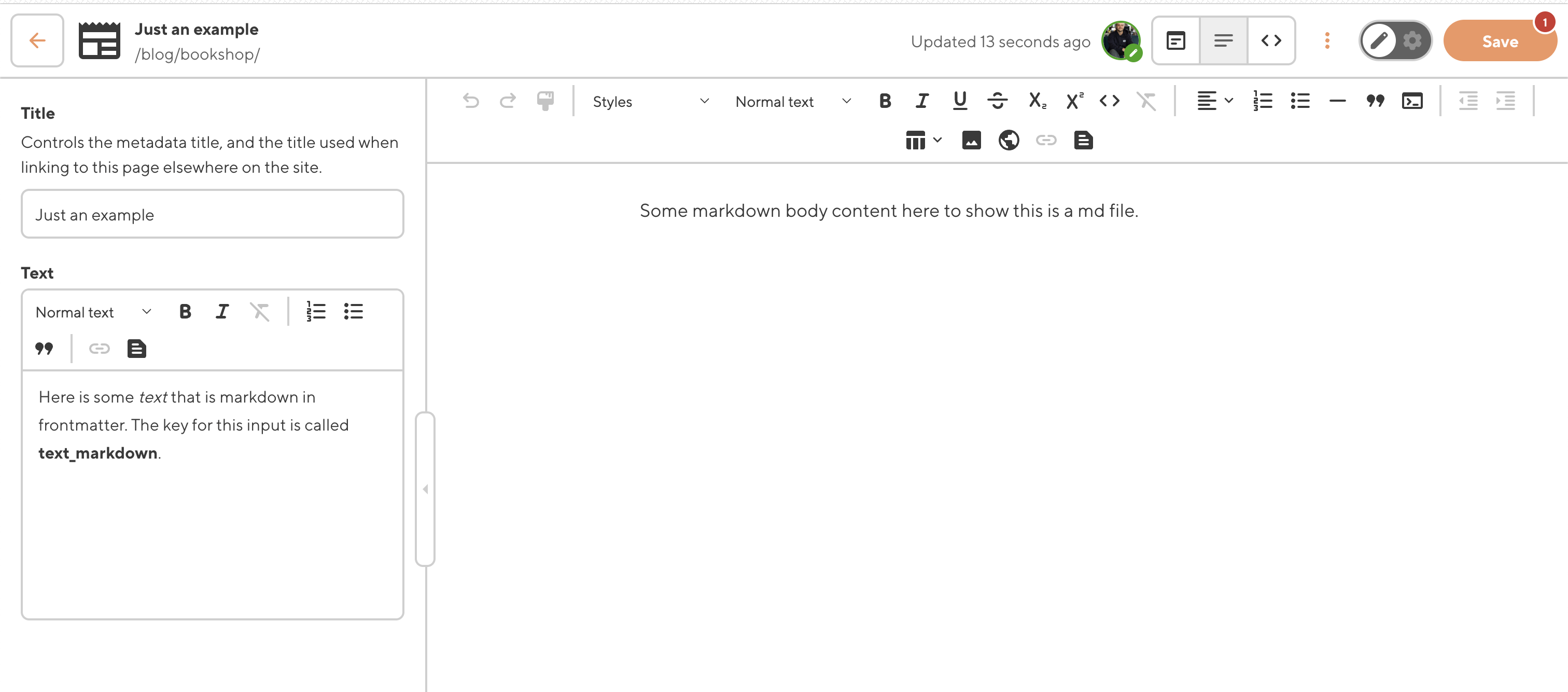
This would provide configuration for any keys of text_markdown that CloudCannon sees. So the frontmatter for a markdown file might look like:

---
title: Just an example
text_markdown: >-
  Here is some *text* that is markdown in frontmatter. The key for this input is called **text_markdown**
---

Some markdown body content here to show this is a md file.

We’d see inputs for both title and text_markdown even without any input config defined. You then define input config for title and text_markdown if you want any of the defaults CloudCannon has provided to be different. You can see in the screenshot, title is still exposed to an editor without any input config required - it’s using the default of a text input. We’ve given the key of text_markdown a label of Text.

This is fundamentally different to some CMS’s which require input configuration for a key before an editor has the ability to edit the value of that key. CloudCannon is the other way around - where we expose all the editable fields, and then you can opt to hide/configure them if you need.

Hope that clears it up! Let me know if there’s still any confusion.

Thanks,
Tom

Hi @Tom_Richardson,

Sorry, I didn’t express myself clearly.

Here’s a concrete example of what I’d like.

_inputs:
  text_markdown:
    label: Text
    type: markdown
  text_area:
    label: Text
    type: textarea
  text:
    label: Text
    type: text


_structures:
  heading:
    values:
      - value:
          title:
          text_markdown:
  data:
    values:
      - value:
          title:
          text:

It’s important for me to have the text key here, even if it comes from text_markdown or text_area.

---
heading:
  title: Just an example
  text: >-
    text from text_markdown input
data:
  title: title data
  text: text frm text input
---

Perhaps I’m doing it wrong?

Thanks,
Seb

1 Like

Hi @sebousan ,

Ah, I see now! Here’s how you would add config for that.

_inputs:
  heading:
    type: object
    options:
      structures: _structures.heading
  data:
    type: object
    options:
      structures: _structures.data

_structures:
  heading:
    values:
      - value:
          title:
          text:
        _inputs:
          text:
            type: markdown
  data:
    values:
      - value:
          title:
          text:
        _inputs:
          text:
            type: text # or could do `type: textarea`
  • We tell CloudCannon that the heading and data inputs (frontmatter keys) are type: object, and which structures those object inputs should use.
  • A structure tells CloudCannon what to add to an object (or array) type input if it’s empty.
  • The structure value has the key of text, since this is what you want the actual key called when the object is added to the page in CloudCannon.
  • Each structure has different configuration for text. That config is scoped to each structure. One structure’s text input is a markdown input, and the other structure’s text input is a normal text input.

Hope that makes sense! Let me know how you get on :slight_smile:

Tom

Hi @Tom_Richardson

Hope your good.

I’m making good progress on my builder, as you can see:

I’m having trouble setting the image paths correctly.

I’d like my image to go in /assets/images/uploads/, but in my front matterr, I want it to be /images/uploads/ because that’s how Hugo Resources works.

Thanks,

Hi @sebousan

Nice, glad to hear it!

paths:
  static: assets
  uploads: assets/images/uploads

This should work for what you’re trying to achieve.

Take an image with the above paths config, and a src path of

<img src="/images/uploads/an-image.png" alt="" />
(This src path could also be templated in from frontmatter)

CloudCannon will look at the path /assets/images/uploads/an-image.png in your unbuilt source code for an image to use as a preview in CloudCannon.

Let me know how it goes,

Tom

Hi @Tom_Richardson

It doesn’t seem to work.

CloudCannon config

paths:
  static: assets
  uploads: assets/images/uploads

CloudCannon commit

He leaves the assets in the front matter.

Thanks,
Seb

Hi Seb,

Looks like you’ve got some paths config that is more specific for that image input than the global paths that you define at the root of the CloudCannon configuration file.

I can see you have some structures config that will override the global paths config for images, since the one defined in a structure is more specific in our configuration cascade.

_structures:  
  image:
    values:
    - _inputs:
        src:
          comment: 'Resize and compress image before sending : https://bulkresizephotos.com/fr?quality=90&type=width&width=1600'
          label: Image
          options:
            accepts_mime_types:
            - image/gif
            - image/jpeg
            - image/png
            - image/webp
            - image/svg+xml
            max_file_size: '700000'
            paths:
              static: static/images/uploads
              uploads: /assets/images/uploads
            required: false
          type: image
      value:
        src: null
        ...

You need to change the paths config on the structure. The correct config for what you’re wanting to achieve is:

paths:
  static: assets
  uploads: assets/images/uploads

Alternatively, you could clear the more specific config defined at the structure level so that the structure falls back to use the global paths config.

Tom

Hi Tom,

Oh thank you! I had forgotten about that cascading configuration.

I’m continuing to work on the compatibility.

Thanks,
Seb

1 Like

Hi Tom,

Is it possible to have the filename as a parameter here?

path gives me the entire path from root and also adds the extension; Hugo doesn’t handle this correctly.

I’ll use the title instead, but I don’t like this practice.

Thanks,
Seb

1 Like

Hi Seb,

You can set value_key to what you want to map the values for the select to. CloudCannon will look for that key in frontmatter, as is happening with title in your example. path and url are special keys where, if they are not set in the front matter, CloudCannon will instead generate suitable values for them.

We’ve discussed this internally, and have decided to add the keys filename, and filename_without_ext to the keys that CloudCannon will generate if they are not present in a collection item’s frontmatter, but are set as the value_key. This update went out with today’s release.

Setting one of these new keys (filename or filename_without_ext) as the value of value_key should do what you’re looking for.

Hope that all makes sense!

Thanks,
David

2 Likes

Hi @David,

Fantastic! Thank you for the incredibly fast improvement.

However, as you know, there’s a particularity with Hugo, namely the _index files.

The best practice is to have terms like this:

content/
└── places/
    ├── bordeaux/
    │   └── _index.md
    └── dunedin/
        └── _index.md

With filename_without_ext, I will have a term named _index in my frontmatter instead of bordeaux or dunedin.

What do you think?

Seb

Hey Seb :waving_hand: That is a good point! On reflection, I think it’s actually probably best to store the full path in the frontmatter.

We could make a special value_key option that transforms _index.md into the name of the containing folder, but I think this would just be pushing the problem around. Really, we (the CloudCannon team) want to surface some raw values that you can control with your SSG templating to get exactly what you want, instead of trying to have a separate option to cover each foreseeable use case.

I’m assuming that you’re using the value of this select to grab a file from your site and render some details about it - is that right? I’m wondering if you save the full path to the file in your frontmatter and use Go templating to resolve this as needed. I’m not much of a Hugo expert so hopefully this isn’t too crude, but I think this could look something like:
---
featured_page: /content/places/bordeaux/_index.md
---
<!-- in your layout file... -->
{{ $cleanedPath := replaceRE `^\/content` "" .Params.featured_page }}

{{ with .Site.GetPage $cleanedPath }}
   <h1>{{ .Title }}</h1>
{{ end }}

Do you think that something like this could work?

1 Like